Search


Before you recharge your prepaid mobile, find the best recharge plan / pack for your exact need. iReff app is the fastest and easiest way to find the recharge plan you need and buy it through our recharge partners. Browse through the common benefit categories - Topup, SMS, Data (GPRS / 2G and 3G), Local, STD, ISD. Or try the powerful full text search feature to find recharge plans matching your specific need.
You can find details about Topup Vouchers, Special Tariff Vouchers (STV), Combo Vouchers and Full Talk Time offers.
Buy the selected recharge plan through our recharge partners Paytm, FreeCharge and Mobikwik. More partners will be added soon.
You can also find commonly used USSD / SMS codes for checking balance and remaining benefits. Want to contact the operator customer care? We got that covered too.
Recharge plan data is updated daily for all operators, based on what is published on the operator website.
We currently support information across all applicable telecom circles for:
* Airtel
* Aircel
* BSNL / MTNL
* Idea
* MTS
* Reliance GSM
* Reliance CDMA
* Tata Docomo GSM
* Tata Docomo CDMA
* T24
* Uninor
* Videocon
* Vodafone
We are continuously making improvements and feature additions. Please keep your app updated to the latest version. In case of any problems please email us at care@ireff.in
The app may show ads from Facebook. See https://m.facebook.com/ads/ad_choices for more details.
The user interface is currently not optimized for landscape layout or for tablets.


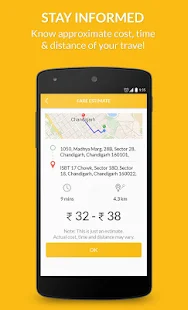
Jugnoo gives you the freedom of traveling stress-free. Jugnoo Autos allows you to book on-demand, affordable and safe rides, without the hassles of getting overcharged. Simply tap and a certified Jugnoo driver reaches your desired location in minutes.
How Jugnoo works:
USe Promo Code SUCHIN99235
1. GPS detects your current location.
2. Tap the auto button in the centre and we ping the nearby Jugnoos.
3. One of the Jugnoo accepts the request and starts your way.
4. Get instant confirmation with driver details.
5. Track the Jugnoo coming your way on the map or call him directly.
6. Carry the meter with you and pay according to distance travelled on completion of the ride..
Jugnoo is changing the way people perceive Autos. Transform the way you travel. Jugnoo drivers are professionally trained and autos go under stringent quality checks.

  Jugnoo Autos - Rickshaw on tap- screenshot thumbnail     Jugnoo Autos - Rickshaw on tap- screenshot thumbnail

  Jugnoo Autos - Rickshaw on tap- screenshot thumbnail     Jugnoo Autos - Rickshaw on tap- screenshot thumbnail

  Jugnoo Autos - Rickshaw on tap- screenshot thumbnail     Jugnoo Autos - Rickshaw on tap- screenshot thumbnail


Featured Video


Lucky-Patcher

Lucky Patcher  Is Good App For Pach All Soft And Game For Android . Download this App From suchintricks .

Lucky Patcher is an application that can patch your apps to Remove the license check, remove advertisements, customize and limit permissions, and also create a modified (Mod version) app, it means the apk file that installs the app with its applied patch. some other features of lucky patcher are: backup apps so you can restore them later, patch apps while booting , patching manually.
NOTE: lucky patcher is not 100% operational, means that the patch may work or may not. it doesn’t warranty!


MagicPix Pro Camera Chromecast
Integrate with LiveView app to view live smartphone video on a Chromecast enabled device. Turn your old smartphone into a powerful security camera, baby monitor, or activity monitor!
MagicPix Pro Camera Chromecast is simply the most powerful and innovative camera app that will be the first choice for 100s of millions of users around the world! Completely redesigned SLR type user interface, Voice activated controls, Android Wear smart watch control for remote control of smartphone camera. Live Histogram display option, Burst mode, Exposure control, color effects! Chromecast your pictures and videos to view on the big screen TV!! No Ads.
Features
  • Chromecast your pictures and videos to a big screen Chromecast enabled TV or any device. With MagicPix Live app, view the smartphone video live on a Chromecast enabled device.
  • Simple, uncluttered SLR camera type interface. Well designed icons that disappear to ensure maximum viewing area.
  • Use your Android Smartwatch to remotely control your smartphone camera and view your pictures. Mind blowing feature that allows flash control, camera switching, video/photo switching remotely from your smartwatch!
  • Voice-activated control for your smartphone camera shutter, switching camera mode, video/photo etc.
  • Better light performance: Take better videos utilizing built in camera flash for improved lighting.
  • Take pictures in HDR mode!
  • Zoom with pinch control.
  • Geotagging – capture geographic location on the pictures.
  • Autofocus: Focus your pictures by clicking or tapping on the screen at the desired area.
  • Use a countdown timer including remote timer through smartwatch.
  • Silent shutter mode.
  • User friendly photo organization. Photos and videos are automatically classified into editable albums that can be edited by the user. Search and caption photos easily. Enjoy pictures in a slideshow.
Many additional features: Transform simple pictures or selfies into masterpieces using various professional quality photo editing modes, photo filters, white balance, color balance, sharpen and blur, photo frames. Instantly share using Email, Bluetooth, Google+, Facebook, Twitter, Tumblr, Google Drive, Dropbox, Instagram, Whatsapp and other apps that are installed on your phone.
What’s New
Added option to select between MagicPix Gallery and Default Phone Gallery
How to Install?
  1. Download Apk from the link below.
  2. On your Android device, go to settings > security > allow unknown sources.
  3. Find downloaded APK file on your phone and install it.
  4. All Done. Enjoy! :)
Screenshots
 Download Links

MagicPix Pro  |  Mirror 1  | Mirror 2 (Latest – 3.8)
MagicPix Pro  |  Mirror 1  | Mirror 2 (Latest – 3.6)
MagicPix Pro  |  Mirrors (Version 3.5)
MagicPix Pro  |  Mirrors (Version 2.7)


Facebook Messenger for Desktop permission is hereby granted, free of charge, to any person obtaining a copy of this software and associated documentation files (the “Software”), to deal in the Software without restriction, including without limitation the rights to use, copy, modify, merge, publish, distribute, sublicense, and/or sell copies of the Software, and to permit persons to whom the Software is furnished to do so, subject to the following conditions:The above copyright notice and this permission notice shall be included in all copies or substantial portions of the Software.
Features
  • Sounds (can be disabled in settings)
  • Desktop notifications (enable them in settings)
  • Voice and video calls
  • Badge with the number of notifications in the dock/taskbar (OS X and Windows)
  • Auto-launch on OS startup (OS X, Windows)
  • Native notifications (all platforms)
  • System tray icon on Windows
  • 3 themes: Default, Dark and Mosaic
  • Auto-hide the left sidebar
  • Open links in browser or new window
  • Preferences in the right-click context menu (or menu bar for OS X, tray menu for Windows)

Whats New:  Some Bug Fix
Direct Download Link
Download Link
Facebook Messenger for Windows (28.1 MB) |
Facebook Messenger for Mac (35.5 MB) |
Facebook Messenger for Linux X32 (38.2 MB) |
Facebook Messenger for Linux X64 (36.4 MB) |

Minuum Keyboard + Smart Emoji
Minuum is a tiny, one-dimensional keyboard that frees up your screen space while allowing you to type fast and accurately. Type quickly without worrying about being precise, thanks to smart auto-correction.
SIMPLIFIED TOUCHSCREEN TYPING
Most existing keyboards take an approach similar to cramming a full typewriter into a touchscreen device. This gives us keyboards that cover up half the usable touchscreen space (or more), obstructing your content. Minuum gives you back your screen space by reducing the standard keyboard to a single dimension.
HOW MINUUM WORKS IN PRACTICE
Minuum re-imagines the keyboard by minimizing a standard layout into a single line, letting you type quickly and accurately without needing large keys. This minimalism is enabled by a specialized auto-correction algorithm that allows highly imprecise typing. These algorithms interpret, in real time, the difference between what you type and what you mean, getting it right even if you miss every single letter.
DISCOVER MORE
The Minuum linear keyboard for touchscreens is just the first step toward a “type anywhere” future. Minuum will let you type on wearable devices like smart watches, game controllers, and more devices of minimum size. By supporting this app, you help to enable that vision.
MINUUM KEYBOARD FEATURES AT A GLANCE
MORE SCREEN SPACE
Recover more than half of the usable touchscreen space you lose when typing on traditional virtual keyboards.
FAST SLOPPY TYPING
Type fast without worrying about being precise, thanks to smart auto-correction.
LARGE-FINGER FRIENDLY
Use key magnification through a zoom view for precise entry of letters, numbers, and punctuation—especially useful if you have large fingers.
FAMILIAR KEYBOARD LAYOUT
You already know how to type with Minuum—it’s just the QWERTY layout, minimized.
DIFFERENT ALPHABET ARRANGEMENTS
Choose from alternate keyboard layouts—such as “QWERTZ,” “AZERTY,” “A-Z.”
FULL FUNCTIONALITY
Get everything you’d expect in a keyboard (such as, punctuation, space, backspace, and enter) without losing your screen space.
EXPANSION TO FULL-SIZED KEYBOARD 
Press with two fingers on the keyboard to switch between mini and full-sized modes (useful for URLs and passwords).
SMART WORD PREDICTION
Speed up your typing by choosing from suggestions made by a predictive engine that learns from you based on your word list, word combinations, and language use patterns.
VOCABULARY CONTROL
Minuum learns from your vocabulary, and you can delete words from your dictionary though a handy pop-up display.
GESTURE SHORTCUTS
Slide your fingers to the corners for quick, convenient access to all your features via pop-up keys.
LANGUAGE CAPABILITY
Initial beta releases of the Minuum keyboard are English-only, but as we widen the beta test we encourage you to give us feedback at support.minuum.com about adding different languages.
VOICE TYPING
Experience hands-free text entry via Google Voice Typing for voice-to-text typing when performing other activities.
Guide
  1. Download the APK
  2. Run & Install it
  3. Done
Screenshots

What’s in this version :
  • -Background optimizations
Download Links
Minuum Keyboard + Smart Emoji v3.4.4 (44MB) | Mirror Link

Notific

It will automatically turn the screen on and display your notification in an easily accessible tabbed dialogue. It will also show notification quick action buttons if expansion is enabled.
If the phone is in pocket, don’t worry. Notific is intelligent enough to understand that and will not turn on the screen. But if you take out the phone from your pocket within 10secs (customizable) it will turn on the screen for you.
Version 2.0 comes with a new Android Wear inspired theme (4.4+), in case you don’t like the dark HOLO style.
Notific doesn’t impact battery life as it will only use the proximity sensor for 10 secs.
The memory usage is highly optimized (2-10MB) and doesn’t use 50MB+ as in other notification apps.                        
Features
  •  You can unlock directly by double tap on circular drag handle.
  • Drag and hold on the dismiss spot to dismiss all notifications
  • Proximity sensor values are calibrated for Nexus devices by default. If you have problems with the sensor on
  • Galaxy or Xperia devices, try calibrating the sensor from Troubleshooting settings or Turn Off Pocket Mode
What’s in this version
  • Fix skype double notifications
  •  Bug fixes and improvements
  •  Happy Holidays :)
  • Please reboot your device after updating
How to Install
  1. Download The Apk given below
  2. Install normally
  3. Done! Enjoy !!        
                                                                             Download