OGYouTube is a very unique YouTube client that lets you download any video from YouTube directly to the memory of your Android device. Best of all, you can do it in any of the available resolutions, and even directly in MP3 format.In general, OGYouTube works exactly like the official YouTube client. Actually, it's an older version of the official client, with just one small difference: a download button below each video. Pressing this button lets you choose the format and quality of the video you want to download to your device's memory.
Naturally, with OGYouTube you can do that you can with the official YouTube client, like playing videos in the background. That said, it is VERY IMPORTANT that you don't log in with your account on OGYouTube. If you do, you won't be able to download videos anymore. For this reason, it's very important not to log in.OGYouTube is probably the best YouTube download client you can find on Android, even if there are others that are also very good. Its usability and interface (the same as YouTube) make it the best possible alternative for downloading videos.Search
Showing posts with label LETEST APPS. Show all posts
Before you recharge your prepaid mobile, find the best recharge plan / pack for your exact need. iReff app is the fastest and easiest way to find the recharge plan you need and buy it through our recharge partners. Browse through the common benefit categories - Topup, SMS, Data (GPRS / 2G and 3G), Local, STD, ISD. Or try the powerful full text search feature to find recharge plans matching your specific need.
You can find details about Topup Vouchers, Special Tariff Vouchers (STV), Combo Vouchers and Full Talk Time offers.
Buy the selected recharge plan through our recharge partners Paytm, FreeCharge and Mobikwik. More partners will be added soon.
You can also find commonly used USSD / SMS codes for checking balance and remaining benefits. Want to contact the operator customer care? We got that covered too.
Recharge plan data is updated daily for all operators, based on what is published on the operator website.
We currently support information across all applicable telecom circles for:
* Airtel
* Aircel
* BSNL / MTNL
* Idea
* MTS
* Reliance GSM
* Reliance CDMA
* Tata Docomo GSM
* Tata Docomo CDMA
* T24
* Uninor
* Videocon
* Vodafone
* Airtel
* Aircel
* BSNL / MTNL
* Idea
* MTS
* Reliance GSM
* Reliance CDMA
* Tata Docomo GSM
* Tata Docomo CDMA
* T24
* Uninor
* Videocon
* Vodafone
We are continuously making improvements and feature additions. Please keep your app updated to the latest version. In case of any problems please email us at care@ireff.in
The app may show ads from Facebook. See https://m.facebook.com/ads/ad_choices for more details.
The user interface is currently not optimized for landscape layout or for tablets.
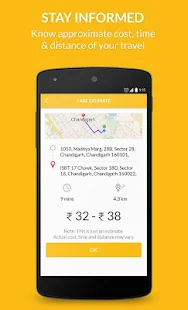
Jugnoo gives you the freedom of traveling stress-free. Jugnoo Autos allows you to book on-demand, affordable and safe rides, without the hassles of getting overcharged. Simply tap and a certified Jugnoo driver reaches your desired location in minutes.
How Jugnoo works:
USe Promo Code SUCHIN99235
1. GPS detects your current location.
2. Tap the auto button in the centre and we ping the nearby Jugnoos.
3. One of the Jugnoo accepts the request and starts your way.
4. Get instant confirmation with driver details.
5. Track the Jugnoo coming your way on the map or call him directly.
6. Carry the meter with you and pay according to distance travelled on completion of the ride..
2. Tap the auto button in the centre and we ping the nearby Jugnoos.
3. One of the Jugnoo accepts the request and starts your way.
4. Get instant confirmation with driver details.
5. Track the Jugnoo coming your way on the map or call him directly.
6. Carry the meter with you and pay according to distance travelled on completion of the ride..
Jugnoo is changing the way people perceive Autos. Transform the way you travel. Jugnoo drivers are professionally trained and autos go under stringent quality checks.
Featured Video
Notific
It will automatically turn the screen on and display your notification in an easily accessible tabbed dialogue. It will also show notification quick action buttons if expansion is enabled.
If the phone is in pocket, don’t worry. Notific is intelligent enough to understand that and will not turn on the screen. But if you take out the phone from your pocket within 10secs (customizable) it will turn on the screen for you.
Version 2.0 comes with a new Android Wear inspired theme (4.4+), in case you don’t like the dark HOLO style.
Notific doesn’t impact battery life as it will only use the proximity sensor for 10 secs.
The memory usage is highly optimized (2-10MB) and doesn’t use 50MB+ as in other notification apps.
Features
- You can unlock directly by double tap on circular drag handle.
- Drag and hold on the dismiss spot to dismiss all notifications
- Proximity sensor values are calibrated for Nexus devices by default. If you have problems with the sensor on
- Galaxy or Xperia devices, try calibrating the sensor from Troubleshooting settings or Turn Off Pocket Mode
What’s in this version
- Fix skype double notifications
- Bug fixes and improvements
- Happy Holidays

- Please reboot your device after updating
How to Install
- Download The Apk given below
- Install normally
- Done! Enjoy !!
The memory usage is highly optimized (2-10MB) and doesn’t use 50MB+ as in other notification apps.
NotifierPro Heads-up
Heads up banner notifications for your device
Features
• NotifierPro completes your notification bar with non-intrusive heads up notification banners.
• NotifierPro can notify you for any app
• You can swipe the notification to the right to dismiss it, to the left to dismiss all notifications, or click it to launch it.
• Numerous themes are available.
• Pebble Watch support
• NotifierPro completes your notification bar with non-intrusive heads up notification banners.
• NotifierPro can notify you for any app
• You can swipe the notification to the right to dismiss it, to the left to dismiss all notifications, or click it to launch it.
• Numerous themes are available.
• Pebble Watch support
The press
“NotifierPro really does make Android’s notifications better” – Lifehacker (May 2012)
“NotifierPro is unique” – AndroidSpin (May 2012)
“If you’re looking for customizability, this is it – Android Police (Apr 2012)
“NotifierPro makes your notifications even better” – Tested.com (May 2012)
“NotifierPro really does make Android’s notifications better” – Lifehacker (May 2012)
“NotifierPro is unique” – AndroidSpin (May 2012)
“If you’re looking for customizability, this is it – Android Police (Apr 2012)
“NotifierPro makes your notifications even better” – Tested.com (May 2012)
** Developers :
– You now have the possibility to develop and publish themes for NotifierPro.
– NotifierPro now includes an API with the ability for developers to raise notifications through the app.
– You now have the possibility to develop and publish themes for NotifierPro.
– NotifierPro now includes an API with the ability for developers to raise notifications through the app.
You need to activate NotifierPro’s accessibility service/notification access for it to be able to notify you. Status bar notifications must be enabled in the monitored apps for NotifierPro to be able to process them.
How to Install?
- Download Apk (link below).
- On your Android device, go to settings > security > allow unknown sources.
- Find downloaded APK on your phone and install it.
- All Done. Enjoy!
Screenshots
Download Links
NotifierPro Heads-up | Mirror 1 |
PDF Scanner PRO: Docs scan + OCR
Convert images to premium quality PDF and upload documents to cloud storage services: dropbox, google drive, evernote, etc.
Enjoy Ad-free interface with PRO version.
What makes our document scanner app different from others:
1) Built-in OCR system (50 languages supported). Extract text from images. All processing is performed locally right on users device, without network connection
2) Signature tool: Add signature or seal to the document: select signature from a file or simply draw it on a screen. Add text, annotation to the document using Text tool. Clean unwanted parts with Eraser tool, highlight important elements using Marker tool
3) Import multiple images or PDF files with one click using built-in file browser
4) Save documents to where you wish (external SD card, for instance). Use settings to select destination folder
5) PDF to JPG converter allows to extract pages from PDF document and convert them to JPG images. Again, all processing is performed locally right on users device, internet is not needed.
6) All image processing in one window, no need to switch between separate screens during image editing
7) Aspect ratio control feature. You can shrink/stretch image as necessary
Permissions:
- Access Network State, Internet, Bluetooth: needed to share documents
- Write External Storage, Test access to protected storage: needed to save documents to your device
Scan documents with your phone camera, edit image, sign, recognize text with OCR, convert to multipage PDF, save, print or share via appropriate app.
Features
- Convert your docs into PDF format
Use your phone camera to scan all kinds of paper documents, ranging from receipts, notes, invoices, business cards to contracts, whiteboard discussions, certificates, etc.
- Efficient image processing
Smart doc detection algorithm, OCR text recognition, perspective correction, rectangular trim, aspect ratio adjustment, image enhancing controls – all in one window for your convenience. This makes scanning process both easy and efficient, especially for batch processing mode.
- Text recognition, OCR
Built-in OCR system to recognise and extract text from images. All processing is performed locally right on users device, what keeps sensitive data contained and secure. You can share recognized text to any app installed on your device to create a new email, sms, translate to other languages with Google Translate (for instance), etc.
- Advanced Editing
PDF scanner is not just a document scanner but also a digital form filling app. You can add signature or seal to the document: select signature from a file or simply draw it on a screen. Add text, annotation to the document using Text tool. Clean unwanted parts with Eraser tool, highlight important elements using Marker tool.
- PDF to JPG converter
Our document scanner is able to extract pages from PDF documents and convert them to high-quality JPG images. Long click on Open button and select PDF file from your SD card for import. Images can be edited inside the app and converted back to PDF, if necessary. You can use this function for digital form filling, for instance.
*Print
There is a function to print out document straight from your device. Click on Share button and select A Printer. Google Cloud Print account is required.
*Share PDF/JPEG Files
Convert images to premium quality PDF and Upload documents to cloud storage services: dropbox, gdocs, evernote, use mail services, bluetooth or facebook, twitter, skype, etc.
How to Install?
- Download Apk (link below).
- On your Android device, go to settings > security > allow unknown sources.
- Find downloaded APK on your phone and install it.
- All Done. Enjoy!
Screenshots
Download Links
PDF Scanner PRO | Mirror 1 |
Google Play Store
Google Play is your one-stop shop for all your favorite entertainment. With over 450,000 apps, millions of songs and books, and thousands of movies, Google Play has something for everyone.
What’s in this version (version 6.0.5): Modded by ChelpuS
- Family Sharing And Gifting
- Option To Easily Add NFC-Enabled Credit Cards
- You can now copy changelogs and descriptions.
- New UI
- Use Google LVL protected apps.
- Offline verification
- New lucky patcher patching not needed any more
- Can not download paid apps for free directly
- Disable self updating
- Billing and License Verification to Proxy does not work
- Refund button reworked
- Bug Fixed
There are Three methods to install it:
- Using Patched Google Play Store apk
- Using Installer(recommended)
- Using Xposed Installer: (For lollipop users as well)
[xrevenue_download_btn]
Method 1 : Instructions for Using Patched Google Play Store apk
- Install latest Lucky Patcher
- Run Lucky Patcher > Menu > Select ‘Patch to Android’
- Select √ ‘Signature Verify always True’ and ‘Disable Zip Signature Verify’ > Apply > Yes
- After reboot go to ‘Patch to Android’ and check (Patch applied). If applied exit from Lucky patcher. otherwise do 3rd step again.
- Backup current Google play with Titanium backup if you want to restore original version in case.
- Rename downloaded ‘Google Patched apk and transfer to sd card. For GingerBread users > rename to ‘Vending.apk’ For ICS / Jelly Bean users > rename to ‘PhoneSky.apk’
- Open Root Explorer and copy/replace renamed apk to ‘/system/app/’ folder
- Set permissions rw-r–r– and Reboot
- Done. All Apps on Device with LVL is licensed. (Tested on GoldenDict, PowerAmp and other)
Method 2: Instructions for Using Installer(recommended)
Install, Run and Reboot
Method 3 : Using Xposed Installer: (For lollipop users as well)
- Install Lucky Patcher
- Install Xposed Installer and Install it from Inside the app
- In Xposed Installer Enable Lucky Patcher Module
- Reboot
- Open Lucky Patcher / Option / Xposed Setting
- Enable All or Which Ever You Prefer
- Done
Important Note for XPOSED USERS
No need to patched core.jar and services.jar . Just use Lucky Patcher Module. Lucky Patcher Module is more stable than patching it the manual way.
Downloads
Google Play Store v6.0.5 Original
Google Play Store v6.0.5.apk | Mirror
Google Play Store v6.0.5 Patched (Original icon) PS: if you receive the “force close” message when you view “Installed” in “My app”, please clear cache & data for Google Play Store app
Google Play store Patched v6.0.5. | Mirror
Installer for Cracked Google Play Store v6.0.5
Google Play Store Installer v6.0.5.apk | Mirror
Note: ROOT REQUIRED! Cheers! 
ROEHSOFT RAM Expander
Insufficient RAM, memory is too small? Use your SD card as a working memory expansion! A Memory Manager wich make’s you life more easy as you think…
A great programmer once said to insufficient RAM -RAM only helps-. Convince yourself how right this man had. Finally, more memory with a click! Memory from Android 1.6 up with root access and external SD card! More memory means that background tasks will never more automaticaly terminated, and many programs will work correctly in the first place!
On many devices, there are problems with games require a lot of memory, this fixes the problems RAMEXPANDER. And they can play latest games on devices that otherwise would not be able to start such APPs. No more out of memory! No more memory is full!
A great programmer once said to insufficient RAM -RAM only helps-. Convince yourself how right this man had. Finally, more memory with a click! Memory from Android 1.6 up with root access and external SD card! More memory means that background tasks will never more automaticaly terminated, and many programs will work correctly in the first place!
On many devices, there are problems with games require a lot of memory, this fixes the problems RAMEXPANDER. And they can play latest games on devices that otherwise would not be able to start such APPs. No more out of memory! No more memory is full!
Features
- Free SD card memory as a RAM use (SWAP RAM / SWAP MEMORY)
- Swapfile RAM expansion up to 4.0 GB (file system limit)
- No limit on SWAP partition!
- The usual performance degradation when paged not occur with sd card from class-8
- Widget for PNP swap (swap on / off swap)
- Detailed Memory Information & Analysis
- Autorun
- Swappiness kernel parameter set
- Easy foolproof use
What’s New
- New Widget Look
- Swapfile Creation SpeedUp
- Some Speed Optimizations
- NotifyMassage is now deleteable.
Screenshots
Downloads
ROEHSOFT RAM Expander (SWAP) v3.36 (5.4 MB) | Mirror
OLD Version
ROEHSOFT RAM Expander v3.35 | Mirrors 1 | Mirror 2
ROEHSOFT RAM Expander v3.33 | Mirrors
ROEHSOFT RAM Expander v3.32 | MirrorsDownload v3.29 APK (5.4 MB) | Mirrors
Download v3.28 APK (5.4 MB) | Mirrors
Download v3.24
Notes
PreCrack
Internet Is Required
ROOTED Device Only
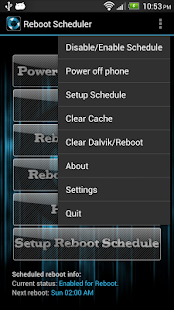
Download app Reboot Scheduler for Android v1.6 Apk latest version is here
Your phone must be rooted to use this app!! Again, ROOT PERMISSION IS REQUIRED TO RUN THIS APP!
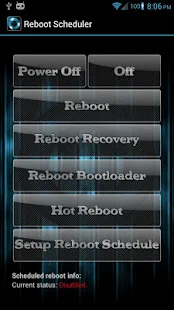
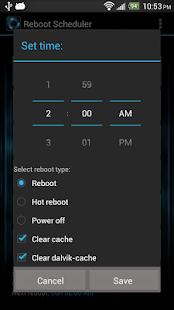
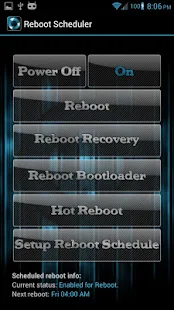
A simple application to schedule reboots for your phone on a daily basis. Schedule options include; reboot, hot reboot and power down with options to clear all app cache and dalvik-cache. If using hot reboot for scheduling, you must first hit the button and accept the superuser permission.
App contains buttons to power your phone off, reboot, hot reboot, reboot to bootloader and reboot to recovery.
App currently contains an enable/disable widget with more widgets coming soon. Also am going to be adding more scheduling options in the near future. App layout looks best on XHDPI phone displays.
Options:
- Reboot on button press.
- Reboot to bootloader.
- Reboot to recovery.
- Power the phone off (shut down).
- Clear all app cache.
- Clear dalvik-cache.
- Hot reboot (reboot system, much faster than reg reboot).
- Schedule time for reboot, hot reboot or shutdown.
- Schedule clearing cache and dalvik-cache.
- Turn on or off reboot confirmations with button press.
- Persistent notification option.
- Turn on or off startup toast notifications.
- Backup your schedule.
- Restore schedul
Permissions:
- Storage – modify/delete SD card contents: this is to backup your schedule to SDcard.
- Phone calls – read phone state and identity: used to see if user is on a phone call.
- System tools – automatically start at boot: this is for the app to schedule the next reboot.
Reboot Scheduler Screenshots:
What’s new in this version:
- Updated for Android 4.4.2. Added options to clear all app data and dalvik cache (scheduling and on demand).
- When clicking on Setup Schedule, will pull previously scheduled data when schedule is enabled.
Requires Android 1.5 and up + rooted device
Download link Reboot Scheduler v1.6 APK:
Zippyshare | Mirror link
Download app Flat Style Bar Indicators Pro v1.3.1 Full Apk latest version is here
Easy way to change statusbar battery, wifi, data indicators themes
App Features:
- Change data indicator // 4 free themes
- Change Wi-Fi indicator // 4 free themes
- Change battery indicator // 3 free themes
- Change carrier label style
- Change clock style
- Change position of data, Wi-FI, battery, clock, carrier label, alarm, bluetooth, sound & location indicators // left, center, right
- Change color of data, Wi-FI, battery, clock & carrier label indicators
PRO version:
- Change data indicator // > 20 themes
- Change Wi-Fi indicator // > 20 themes
- Change battery indicator // > 20 themes
- Change bluetooth indicator // 3 themes
- Change alarm indicator // 7 themes
- Change sound indicator // 8 themes
- Change location indicator // 6 themes
- Change limit of visible notifications count
- Show Network Speed indicator
- Change position of network speed indicator // left, center, right
- Change color of network speed indicator
Todo List:
- option to change icons for headsets, sync
- option to place percentage for battery above of the icon
- option to set negative padding for indicators
IMPORTANT!
– Requires Xposed Framework. More about it http://bit.ly/XposedFramework
– Works ONLY with Android 4.3.x – 5.1.x
– Supports only SAMSUNG, HTC, LG, ASUS, SONY, MOTOROLA, HUAWEI and maybe several some other known brands, any other noname devices I’m not supporting because they all have different system changes, so I haven’t time to support all devices.
If something doesn’t work for you, I need 2 things from your phone:
– Enable “Logging” in my module >> reboot >> wait several minutes >> give me your logs
– Give me framework-res.apk & SystemUI.apk, but if you have odexed ROM I also need SystemUI.odex file and zipped all framework dir
– Enable “Logging” in my module >> reboot >> wait several minutes >> give me your logs
– Give me framework-res.apk & SystemUI.apk, but if you have odexed ROM I also need SystemUI.odex file and zipped all framework dir
Flat Style Bar Indicators Pro Screenshot:
What’s new in this version: (updated Dec 24, 2015)
- Fixed missing data type on LG G4.
- Fixed doubled battery on some devices.
- Added support for Cherry mobile flare s3 mini, Q620 with Andoird 4.4.
- Added ability to tint multiple data indicators with different colors.
- Added ability to place multiple data indicators vertically (experimental feature)
- Fixed several other minor bugs.
Requires Android 4.3 and up + Rooted device + Xposed Framework
Download link Flat Style Bar Indicators Pro v1.3.1 APK:
Download app PowerDirector Video Editor v3.5.0 Full Unlocked Apk latest version is here
CyberLink brings the multi-award winning PowerDirector from PC to Android tablets and mobiles! The most powerful video editor on the market, PowerDirector gives you the power to create amazing, awesome, engaging videos on-the-go. Import and edit videos, add effects and titles, and export HD video directly to Facebook or YouTube.
With PowerDirector’s easy-to-use timeline interface, you can quickly create professional, effect rich videos with just a few swipes of your finger. Selecting and importing multiple videos is easy with PowerDirector’s drag-and-drop support, and the easy-to-view timeline makes it splitting, trimming and adding effects to your videos a breeze.
App Features:
- Have a professional style editor with timeline workspace
- Drag-and-drop content and effects for quick, easy and accurate editing
- Add photos and audio tracks to your videos
- Select from over 20 effects to add to your videos
- Add over 20 transition effects to your clips
- Record voice-over for your clips
- Easily save your projects on your device to continue editing later
- Export your creations to amazing HD or Full HD* quality
- Upload your amazing creations directly to Facebook or YouTube as soon as you’re done
- Quickly access your saved projects as soon as you launch the app
SYSTEM REQUIREMENTS
– Android 4.3 and above
Works best with:
– Qualcomm Snapdragon S4 or higher
– Samsung Exynos 5xxx or higher
– Nvidia Tegra 3 or higher
– Mediatek MT8125 or higher
– Qualcomm Snapdragon S4 or higher
– Samsung Exynos 5xxx or higher
– Nvidia Tegra 3 or higher
– Mediatek MT8125 or higher
SUPPORTED FORMATS
– Video:H.263 (.3GP, .MP4, .MKV), H.264 AVC (.3GP, .MP4, .MKV), MPEG-4 SP (.3GP, MP4, MKV), VP8 (.MKV)
– Photo:JPEG, GIF, PNG, BMP, WebP
– Music:WAV, MP3, MP4, M4A, AAC
– Video:H.263 (.3GP, .MP4, .MKV), H.264 AVC (.3GP, .MP4, .MKV), MPEG-4 SP (.3GP, MP4, MKV), VP8 (.MKV)
– Photo:JPEG, GIF, PNG, BMP, WebP
– Music:WAV, MP3, MP4, M4A, AAC
Now available on Android mobile and tablets!!
PowerDirector Video Editor Screenshot:
What’s new in this version: (updated Dec 24, 2015)
- Freely rotate your images and text titles as overlays on your videos.
- Creative new title fonts for FREE.
Requires Android 4.3 and up